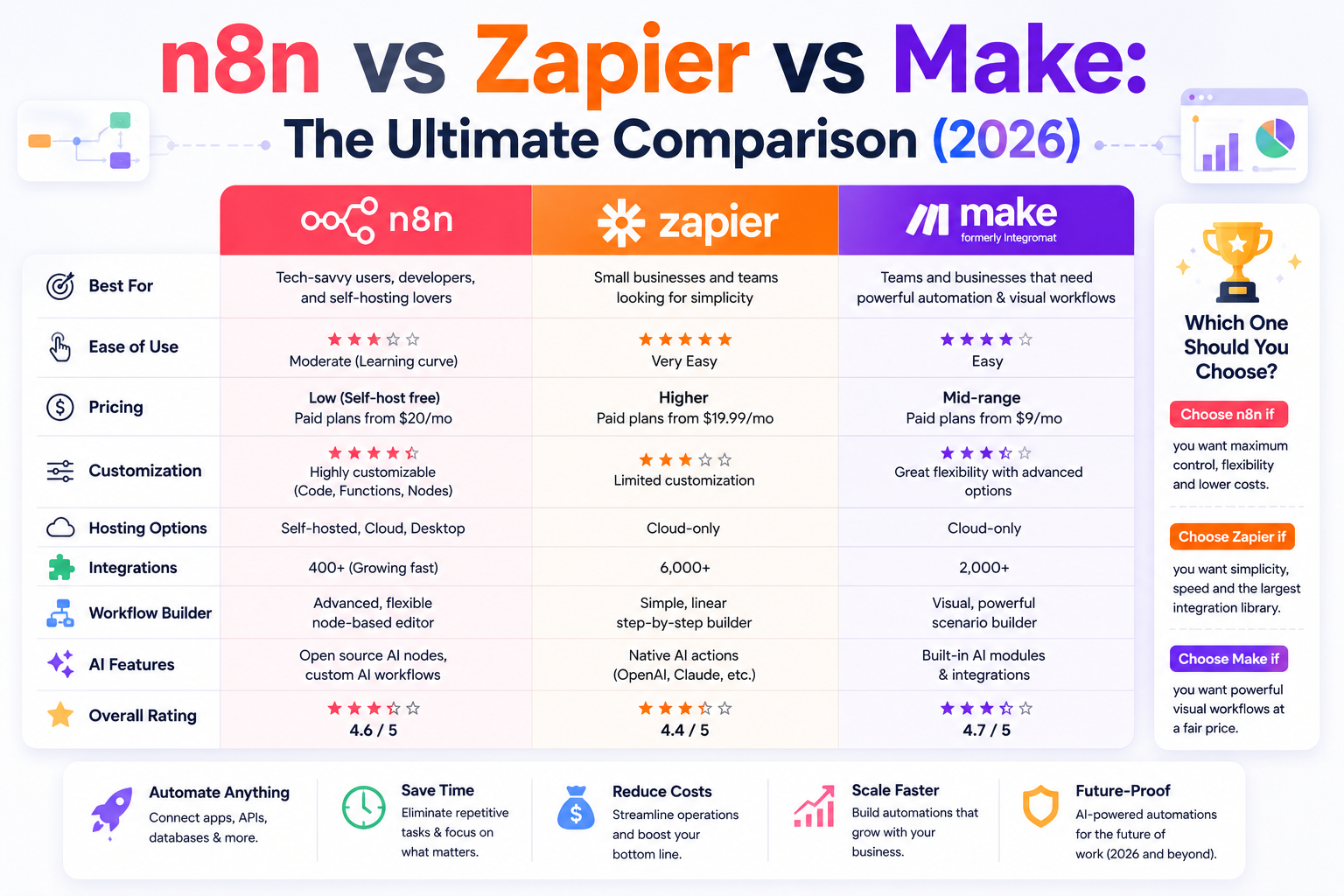
| Quick Answer (AI Overview snippet) Zapier is best for beginners and the widest app coverage (7,000+ integrations). Make is best value for visual, complex workflows at $9/month entry pricing. n8n is best for technical teams and AI agents: self-host it free with unlimited workflows, or use n8n Cloud from $20/month. Choose Zapier for simplicity, Make for price-to-power ratio, and n8n for data ownership, AI agents and zero per-task fees. |
Three Platforms, Three Philosophies
Every serious conversation about workflow automation in 2026 eventually arrives at the same three names: Zapier, Make and n8n. They solve the same problem — connecting your apps so work happens without you — but they embody three completely different philosophies about how automation should be built, priced and owned.
Zapier is the product philosophy: maximum polish, maximum coverage, minimum friction, premium price. Make is the value philosophy: professional-grade visual tooling at a fraction of the cost, if you will invest a few hours of learning. And n8n is the ownership philosophy: open-source code you can run on your own server, with no per-task meter running, and the most advanced AI-agent tooling of the three.
We covered the two-way Make vs Zapier comparison in depth already; this guide adds n8n to the ring and answers the three-way question properly: which platform should run your business in 2026? We will compare ease of use, integrations, AI capabilities, pricing, hosting, reliability and ideal use cases — with a clear verdict for each type of user.
n8n vs Zapier vs Make: Quick Comparison Table
| Factor | Zapier | Make | n8n |
| Integrations | 7,000+ | 2,000+ | 400+ native, unlimited via HTTP |
| Editor | Linear list | Visual canvas | Visual node graph |
| Learning curve | Easiest | Moderate | Steepest |
| Self-hosting | No | No | Yes — free, unlimited |
| AI agents | Zapier Agents | Make AI Agents | Best-in-class agent nodes |
| Custom code | Limited | Limited | Full JavaScript/Python nodes |
| Pricing model | Per task | Per operation | Per execution (cloud) / free (self-host) |
| Free tier | 100 tasks/mo | 1,000 ops/mo | Unlimited self-hosted |
| Entry paid plan | $19.99/mo | $9/mo | $20/mo cloud |
Ease of Use: From Gentle to Technical
Zapier remains the easiest automation tool on the planet. Its step-by-step editor, plain-English field labels and AI Copilot mean a non-technical founder ships a working automation in minutes. There is simply no faster route from idea to running workflow.
Make sits in the middle. The drag-and-drop canvas takes an evening to feel natural, after which most users prefer it: seeing data flow visually through each module turns debugging from guesswork into observation. Non-technical users can absolutely master Make — it just asks for patience that Zapier does not.
n8n is the most demanding of the three. Its node-based editor resembles Make’s canvas, but the platform assumes more from you: expressions use JavaScript syntax, data arrives as JSON you are expected to read, and the best workflows lean on code nodes. A marketer with zero technical background will struggle; anyone who has written a spreadsheet formula and is willing to learn will be fine within a week, helped by thousands of community workflow templates you can import in one click.
Winner: Zapier, then Make, then n8n — in exactly that order, by design.
Integrations: Count Isn’t Everything
On raw numbers, Zapier’s 7,000+ app directory is untouchable, and for businesses running long-tail niche software that single fact often decides the whole comparison. Make’s 2,000+ native apps cover virtually every mainstream business tool, with a generic HTTP module filling gaps for anyone comfortable reading API docs.
n8n lists a more modest 400+ native integrations — but the number is misleading. Its HTTP Request node, webhook triggers and code nodes mean n8n can talk to literally any service with an API, often with more control than the packaged integrations on other platforms offer. The native nodes cover the essentials: Google Workspace, Slack, Notion, Airtable, HubSpot, Shopify, Postgres, OpenAI, Anthropic and the rest of the modern stack. The honest framing: Zapier integrates with everything out of the box; n8n integrates with everything if you build the box.
Winner: Zapier for convenience; n8n for unlimited reach in technical hands.
AI Capabilities: n8n Pulls Ahead
This is where the 2026 comparison differs most from older articles. All three platforms now ship AI features, but they are not remotely equivalent.
Zapier offers packaged AI steps (summarize, classify, extract, draft), the Copilot that builds Zaps from plain English, and Zapier Agents for goal-driven automation. It is the most accessible AI layer — and the least controllable.
Make provides native modules for OpenAI, Anthropic and Google with full prompt and parameter control, plus its own AI Agents. You pay model providers directly at wholesale rates and engineer exactly the behavior you want.
n8n goes furthest. Its LangChain-based AI nodes let you compose agents with memory, tool use, retrieval over your own documents (RAG), multi-model routing and human-in-the-loop approval — the kind of architecture that elsewhere requires custom code. If your ambition is an AI agent that reads tickets, queries your database, drafts answers and escalates edge cases, n8n is the only one of the three where that is a native, visual build.
Model choice matters here too: self-hosted n8n pairs beautifully with open-weight models if you want zero data leaving your infrastructure — see our guide to the Best Open Source AI Models in 2026 for which ones to run.
Winner: n8n, clearly, for anyone building serious AI workflows.
Pricing: The Self-Hosting Earthquake
Zapier charges per task and is the most expensive at every volume. Make charges per operation at roughly a fifth of Zapier’s effective rate. And n8n changes the question entirely: the self-hosted Community Edition is free forever, with unlimited workflows and executions — your only cost is a server, typically $5 to $20 a month for a small VPS that comfortably runs hundreds of thousands of executions.
| Monthly volume | Zapier | Make | n8n self-hosted |
| ~10,000 units | $73.50 | $16 | ~$10 server |
| ~40,000 units | $187+ | $34 | ~$10 server |
| ~150,000 units | $599+ | $99–120 | ~$20 server |
n8n Cloud exists for teams that want the economics partially and the maintenance not at all: plans start at $20/month for 2,500 executions, and because n8n bills per workflow execution rather than per step, a 20-step workflow costs the same as a 2-step one — a quietly enormous advantage for complex automations.
Winner: n8n by a landslide for technical teams; Make for everyone else.
Data Ownership, Privacy and Compliance
For some businesses this section outranks every other. With Zapier and Make, your data — customer emails, lead details, financial records — flows through their clouds. Both are reputable companies with strong security practices, but for healthcare, legal, finance or EU-strict organizations, third-party processing is a compliance conversation at minimum.
Self-hosted n8n removes the conversation: data never leaves infrastructure you control. Combine it with a self-hosted database and a local or EU-hosted AI model and you have a fully sovereign automation stack — something neither competitor can offer at any price. This single property is why n8n has become the default choice in regulated industries.
Winner: n8n, uncontested.
Which Platform Should You Choose?
Choose Zapier if…
- You want results today with zero learning curve, your monthly volume is modest, or your stack includes niche apps only Zapier supports.
- Non-technical teammates will build and maintain automations themselves.
Choose Make if…
- You want the best power-to-price ratio without managing servers, and your workflows involve branching, routing or volume that makes Zapier expensive.
- You are a freelancer or agency building automations for clients who need an accessible UI.
Choose n8n if…
- You (or anyone on your team) are comfortable with light technical work, and you want unlimited executions, full data ownership and zero per-task anxiety.
- AI agents are central to your plans — RAG, memory, tool use and multi-step autonomy are native n8n territory.
Still mapping the wider landscape? Our Ultimate Guide to AI Automation Tools 2026 places all three platforms alongside the AI assistants and vertical tools they orchestrate, and our Zapier + AI guide remains the fastest on-ramp if you start there.
Our Real-World Test: One Workflow, Three Builds
To keep this comparison honest, we built the same automation on all three platforms: monitor a support inbox, classify each email with AI, draft a reply in brand voice, log the ticket to a database and escalate angry customers to Slack.
Zapier: live in 25 minutes using AI by Zapier for classification. Drafts were serviceable but generic — the packaged AI step accepts only limited prompt customization. Six tasks per email.
Make: live in roughly an hour. The Anthropic module with a tuned system prompt produced noticeably better drafts, and a router cleanly separated the escalation path. Cost per email: six operations plus fractions of a cent in API fees.
n8n: live in about two hours including server setup — the longest build and the best result. The AI Agent node holds conversation memory per customer, retrieves answers from our help-docs vector store before drafting, and asks for human approval on refunds. Cost per email after setup: effectively zero.
The pattern repeats across every workflow we test: setup time and ongoing cost trade off almost perfectly, and n8n’s ceiling is simply higher when AI is involved.
Common Mistakes When Choosing Between These Platforms
- Choosing on integration count alone. You will realistically connect 8–15 apps, not 7,000. List your actual stack and check all three directories before letting the headline number decide — most small businesses discover every app they use is covered by all three platforms.
- Ignoring the cost curve. Teams pick Zapier at 500 tasks a month, succeed, scale to 50,000 — and only then discover the bill. Project your volume twelve months out before committing; migration later costs far more attention than choosing well now.
- Overestimating the technical barrier of n8n. “Self-hosting” sounds like a weekend of server administration; in practice it is a 15-minute Docker install and the occasional one-command update. If anyone on your team has deployed anything, n8n is within reach.
- Underestimating maintenance. Whichever platform you choose, automations are living systems: APIs change, fields get renamed, edge cases appear. Budget an hour a month for upkeep and build failure alerts on day one — a silent broken workflow is worse than no workflow.
- Building everything on day one. The teams that succeed automate one painful process, run it for two weeks, then expand. The teams that churn build fifteen workflows in a weekend and abandon the platform when three of them misbehave at once.
Frequently Asked Questions
n8n is better for technical teams, AI agents and budgets: self-hosted, it offers unlimited workflows free, full data ownership and the most advanced agent tooling. Zapier is better for beginners and app coverage; Make is better for non-technical users who want visual power at low cost. The best platform depends on your team’s technical comfort.
Yes. The self-hosted Community Edition is free with unlimited workflows and executions; you pay only for a server, typically $5–$20 per month. n8n Cloud, the managed version, starts at $20 per month for 2,500 executions.
Harder than Zapier and somewhat harder than Make. Expect a few days to feel comfortable if you have basic technical aptitude. Thousands of free community templates dramatically shorten the curve — most beginners start by importing one and modifying it.
n8n leads for advanced AI: native agent nodes with memory, retrieval (RAG), tool use and human-in-the-loop approval. Make is the best balance of AI control and accessibility. Zapier offers the easiest AI features but the least customization.
For most workflows, yes — any app n8n lacks a native node for can be reached through its HTTP Request node. The honest exceptions are teams with zero technical capacity and stacks dependent on very obscure apps where Zapier’s pre-built integrations save real effort.
A small VPS with 1–2 GB of RAM runs n8n comfortably for most small-business workloads — roughly $5–$10 per month at providers like Hetzner or DigitalOcean. Docker installation takes under 15 minutes following n8n’s official guide.
Final Verdict: n8n vs Zapier vs Make in 2026
There is no single winner — there is a right answer per team. Zapier is the best first automation platform ever made; start there if speed and simplicity are everything. Make is the best value in mainstream automation; graduate there when volume and complexity grow. And n8n is the best automation platform, full stop, for any team with the technical capacity to run it — unlimited scale, total ownership and AI-agent capabilities the others are still catching up to.
Our suggested path for a growing business: prototype on Zapier’s free plan, run production on Make while volumes are mid-sized, and plan your move to self-hosted n8n the day automations become core infrastructure rather than convenience. Each step down that path trades a little ease for a lot of power — make the trade when you are ready, not before.
Disclaimer: The information in this article is for general informational purposes only and does not constitute professional, financial or legal advice. Pricing and features are accurate as of publication but may change; always verify details on the official vendor websites before purchasing. AI Automation Hacks is not affiliated with the companies mentioned except through standard affiliate partnerships disclosed above. See our full Disclaimer and Privacy Policy.
Affiliate Disclosure: This post may contain affiliate links. If you purchase a tool through one of our links, we may earn a small commission at no extra cost to you. We only recommend tools we have personally tested and believe will add real value to your business. Read our full Disclaimer for details.