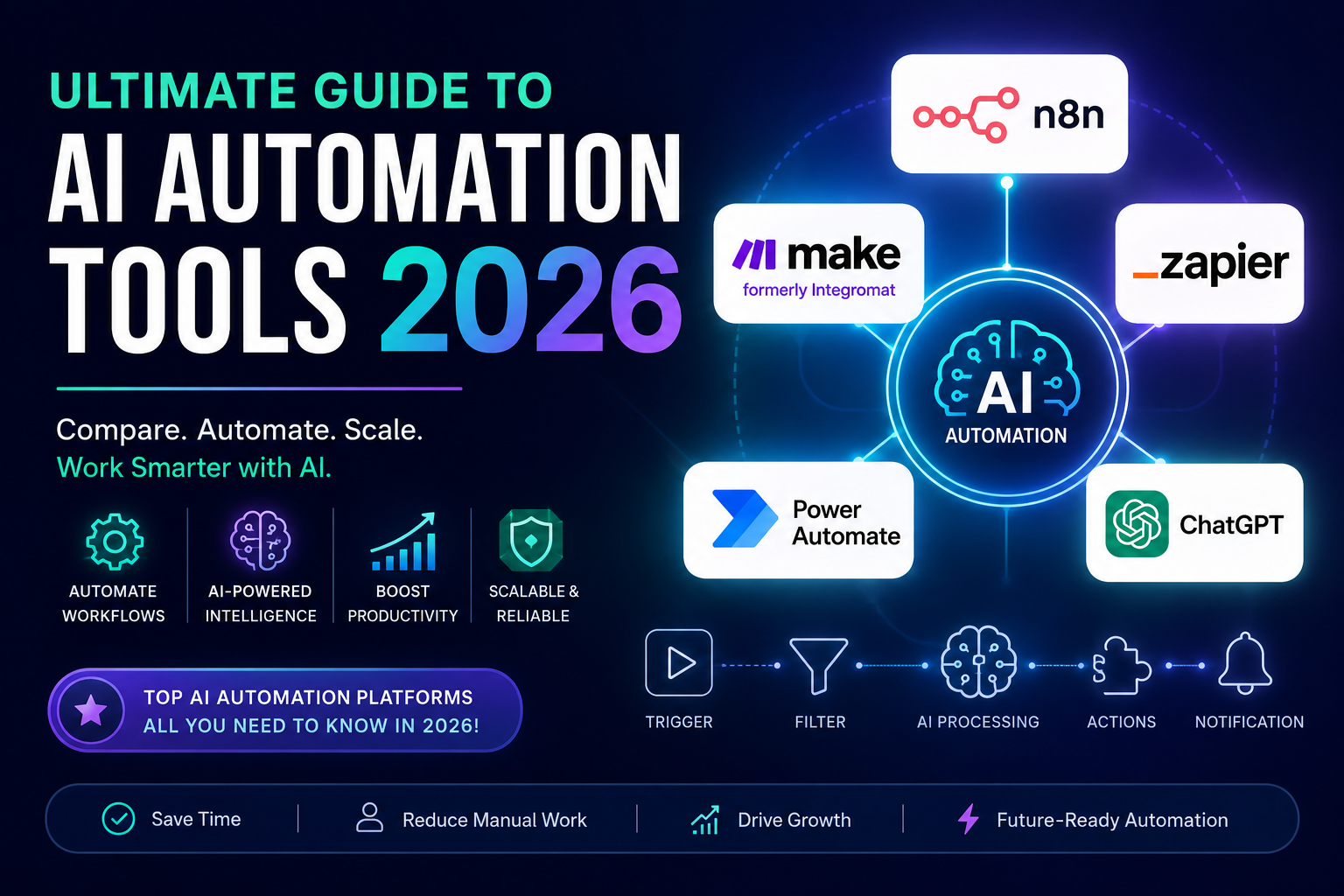
The most comprehensive, up-to-date resource for AI workflow automation — covering every major platform, real use cases, pricing breakdowns, and step-by-step tutorials for beginners and power users alike.
Affiliate Disclosure : This post contains affiliate links. If you purchase through these links, we may earn a commission at no extra cost to you. We only recommend tools we genuinely use and believe in. This helps us keep producing free content.
Why AI Automation Is the Skill You Need in 2026
Not long ago, automating a business workflow meant hiring a developer, writing custom scripts, and praying nothing broke on a Tuesday morning. In 2026, that world is gone. AI automation tools have democratized the entire process — whether you run a solo freelance operation, manage a busy marketing team, or oversee IT infrastructure for a mid-size company.
The global workflow automation market is on track to surpass $26 billion by 2025, and AI is supercharging that growth. Tools like n8n, Make (formerly Integromat), and Zapier now let non-technical users build sophisticated workflows in hours, not weeks. Add in native AI features — think GPT-powered data transformation, sentiment analysis triggers, and intelligent routing — and the possibilities have become genuinely staggering.
This guide covers everything: a comprehensive tool comparison, pricing breakdowns, beginner-friendly tutorials, agency use cases, and specific guides for every major platform in the ecosystem.
🎯 What You Will Learn in This Guide
The top AI automation platforms ranked and compared • How to choose the right tool for your budget and use case • Step-by-step tutorials for Make, Zapier, n8n, and Power Automate • Free tool options that are actually worth using • How to connect ChatGPT to virtually any app • Agency and small business workflows that save 10+ hours per week
1. What Is AI Automation? (And Why It Matters in 2026)
AI automation is the combination of artificial intelligence — machine learning, natural language processing, predictive logic — with workflow automation software to create systems that not only execute repetitive tasks but also make decisions along the way.
Traditional automation: If an email arrives with subject “Invoice,” move it to folder.
AI automation: If an email arrives, read its contents, determine if it’s an invoice, extract the total amount, check against your accounting database, flag anomalies, and notify your finance team — all without human intervention.
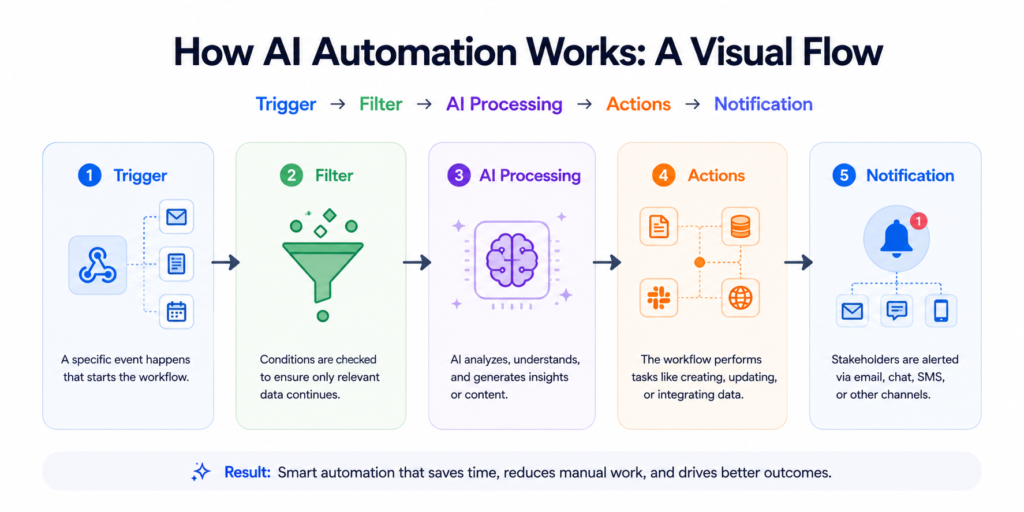
The Core Components of AI Automation
- Triggers: Events that start a workflow (a new form submission, a Slack message, a scheduled time)
- Actions: What happens in response (send an email, create a task, generate a report)
- AI Steps: Where intelligence is applied (classify content, extract data, generate text, make decisions)
- Integrations: The connectors that link your apps together (CRMs, email platforms, databases, APIs)
How AI Automation Works: A Visual Flow
Who Benefits Most from AI Automation in 2026?
- Freelancers and solopreneurs: Automate client onboarding, invoicing, and content scheduling
- Small businesses: Replace repetitive admin tasks, automate customer support responses
- Marketing teams: Build lead nurturing sequences, social posting pipelines, and reporting dashboards
- Agencies: Scale operations without scaling headcount — automate deliverable workflows end-to-end
- IT and operations teams: Incident response automation, system monitoring, and data pipeline management
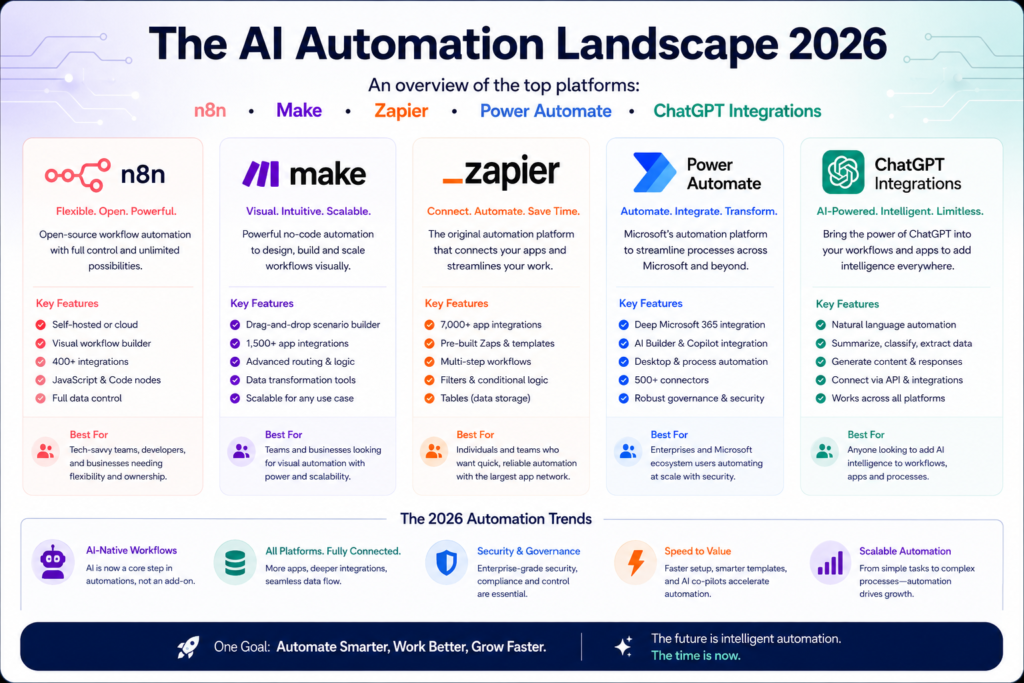
2. Top AI Automation Platforms at a Glance
Here’s a quick snapshot of the major players before we dive deep. This comparison table is designed to help you make a decision in 60 seconds if needed.
| Platform | Best For | Free Plan | Starting Price | AI Features | Complexity |
| n8n | Developers & self-hosters | Yes (self-host) | $20/mo (cloud) | Built-in AI nodes | Medium-High |
| Make (Integromat) | Visual power users | Yes (1,000 ops/mo) | $9/mo | AI router, OpenAI | Medium |
| Zapier | Beginners & marketers | Yes (100 tasks/mo) | $19.99/mo | Zapier AI, Copilot | Low-Medium |
| Power Automate | Microsoft 365 users | Yes (M365 included) | $15/user/mo | Copilot, AI Builder | Medium-High |
| Activepieces | Budget-conscious teams | Yes (generous) | $9/mo | OpenAI connector | Low-Medium |
3. n8n vs Make vs Zapier: The Definitive Comparison
These three platforms dominate the automation conversation — and choosing between them is the question we get asked most often. The full deep-dive comparison lives in its own dedicated guide (linked below), but here’s the executive summary.
When to Choose n8n
- You want full control over your data and prefer self-hosting
- You have some technical background or a developer on the team
- Your automation needs are complex with custom code logic
- Long-term cost is a priority — self-hosted n8n is effectively free
When to Choose Make
- You want the most powerful visual automation builder available
- You need complex branching, data transformation, and error handling
- You are building automation for clients or as a productized service
- You want a balance between power and usability
When to Choose Zapier
- You are new to automation and want the gentlest learning curve
- Your team is non-technical and needs intuitive setup
- You rely heavily on popular SaaS apps (Zapier has 6,000+ integrations)
- Speed of setup matters more than flexibility
Related Guides in This Series
- Full Comparison: n8n vs Make vs Zapier
- Make.com Step-by-Step Tutorial
- Zapier AI Features Guide
- Power Automate AI Deep Dive
4. Best Free AI Automation Tools
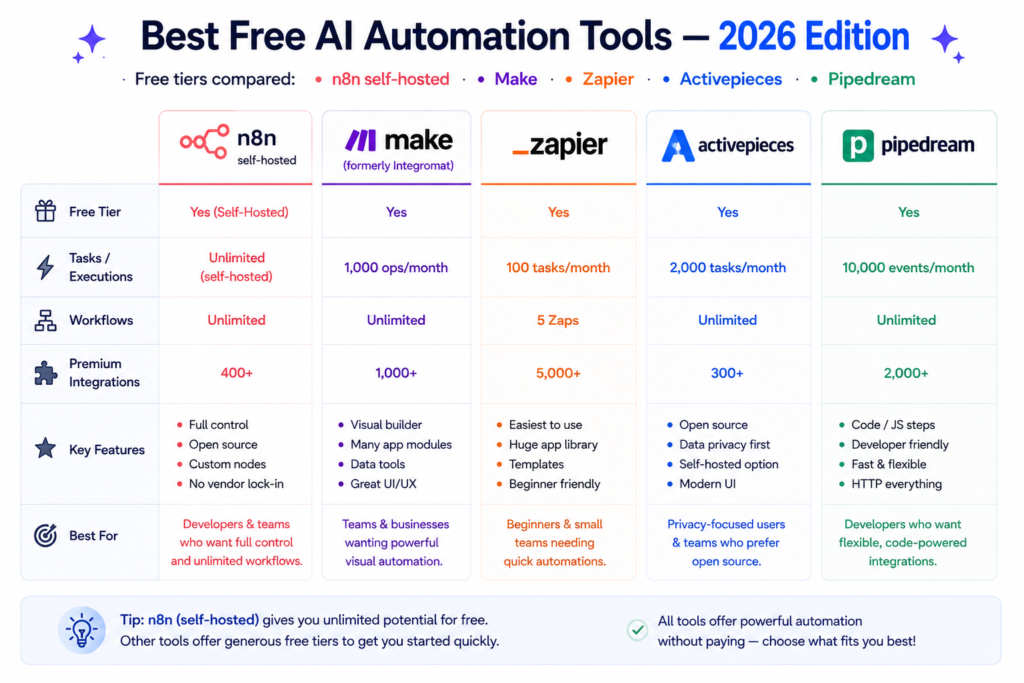
Cost is often the first barrier to getting started. The good news: you can build remarkably powerful automations without spending a cent — at least to start.
| Tool | Free Tier Limit | Best Free Use | AI Included? | Paid From |
| n8n (self-hosted) | Unlimited workflows | All use cases | Yes | $20/mo cloud |
| Make.com | 1,000 ops/month | Simple workflows | Yes (OpenAI) | $9/mo |
| Zapier | 100 tasks/month | Testing & learning | Limited | $19.99/mo |
| Activepieces | Unlimited (self-host) | Growing teams | Yes | $9/mo |
| Pipedream | 10,000 events/mo | Developer workflows | Yes (code + AI) | $19/mo |
Related Guides in This Series
- Best Free AI Automation Tools — Full Guide
5. No-Code AI Automation for Beginners
The term “no-code” sometimes creates a false sense that automation is easy enough to set up in ten minutes with zero research. The reality is that no-code automation has a learning curve — but it’s a very manageable one, especially with the right starting point.
Your First Automation in 4 Steps
- Identify one repetitive task you do every single week
- Choose a platform (Zapier for simplest, Make for flexibility)
- Connect the two apps involved using pre-built templates
- Test with real data, then turn it on
The most common first automation? “When I get a new email with a specific subject, add a row to my Google Sheet.” That one workflow alone saves most beginners 20–30 minutes per week.
💡 Pro Tip for Beginners
Don’t try to automate everything at once. Start with your single most repetitive task. Get one workflow running perfectly before building the next. Most successful automation practitioners started with one Zap or Make scenario and built from there.
| Related Guides in This Series No-Code AI Automation for Beginners — Full Guide AI Workflow Automation for Beginners |
6. Platform Deep Dives
Each of the major platforms has its own strengths, quirks, and ideal use cases. We’ve written dedicated, step-by-step guides for each one — linked below. Here’s a quick orientation for each.
Make.com (formerly Integromat)
Make is the power user’s choice. Its visual scenario builder lets you map out complex, multi-branch workflows that would require a developer on other platforms. The learning curve is slightly steeper than Zapier, but the payoff in flexibility is enormous.
Affiliate note: Make’s paid plans start at $9/month (affiliate link) — exceptional value for what you get.
- Best for: Complex data transformation, multi-step workflows, client automation work
- AI capabilities: OpenAI module, AI data router, HTTP module for any AI API
- Notable: Iterator and aggregator modules handle bulk data processing elegantly
Zapier AI Features
Zapier has invested heavily in AI in 2025-2026. Zapier Copilot now lets you describe a workflow in plain English and generates the Zap for you. AI by Zapier allows GPT-4o-powered text generation within any workflow step.
- Best for: Beginners, non-technical teams, users with 5,000+ app integrations need
- AI capabilities: Copilot workflow builder, AI by Zapier action, Formatter AI
- Notable: Largest app library of any automation platform
Microsoft Power Automate
Power Automate is the enterprise champion. If your organization is deep in the Microsoft 365 ecosystem — Teams, SharePoint, Outlook, Dynamics — it’s practically a necessity. Copilot integration makes building flows in natural language genuinely practical.
- Best for: Enterprise, Microsoft shops, RPA (robotic process automation)
- AI capabilities: AI Builder, Copilot, Azure AI integrations
- Notable: Desktop automation for legacy apps that lack APIs
Related Guides in This Series
- Make.com Step-by-Step Tutorial
- Zapier AI Features Guide
- Power Automate AI Deep Dive
7. How to Connect ChatGPT with Any App
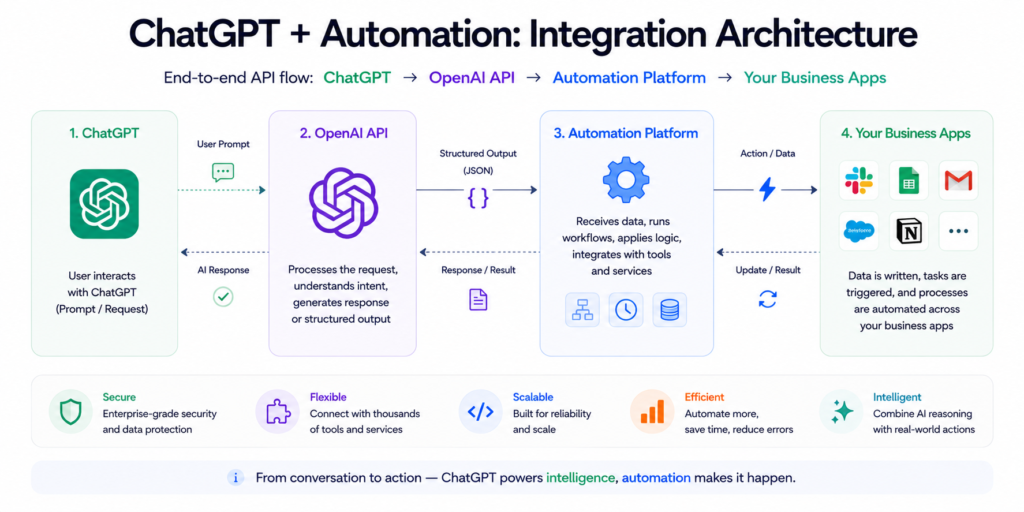
This is the question everyone is asking in 2026 — and for good reason. GPT-4o is genuinely transformative when wired into real business workflows. The good news is you don’t need to write a single line of code.
The Three Methods
- Method 1: Native integrations — Zapier, Make, and n8n all have official OpenAI/ChatGPT modules. Drag, drop, configure, done.
- Method 2: API via HTTP module — For platforms without native AI connectors, use an HTTP request module to call OpenAI’s API directly. You’ll need an API key and basic understanding of JSON.
- Method 3: GPT Actions (ChatGPT plugins) — Build custom GPT Actions that connect ChatGPT directly to your apps, APIs, and databases. No separate automation platform needed.
| Related Guides in This Series How to Connect ChatGPT with Any App — Full Tutorial |
8. AI Automation for Small Businesses & Agencies
The ROI calculation for AI automation is most compelling at the small business and agency level. Here’s why: large enterprises have dedicated IT and operations teams. Small businesses and agencies are running lean — every hour saved directly impacts profitability.
High-Impact Automation Workflows for Small Businesses
- Lead capture and CRM entry: New web form submission → create CRM contact → send welcome email → assign to sales rep
- Invoice and payment tracking: Invoice sent → monitor for payment → automated follow-up sequences → payment confirmed → bookkeeping entry
- Social media scheduling: Approve content in Notion → automatically scheduled across LinkedIn, Instagram, and X
- Customer support triage: Incoming support email → AI classifies urgency → routes to correct team → sends acknowledgment to customer
Agency-Specific Workflows
- Client onboarding: Contract signed → create project in PM tool → Slack channel created → welcome email sent → kickoff calendar invite sent — all automated
- Reporting pipeline: Pull data from ad platforms, CRM, and analytics → AI generates insights → formatted report created → delivered to client inbox on schedule
- Deliverable pipeline: Asset completed in Figma → reviewed in Frame.io → approval triggers delivery email and invoice creation
Related Guides in This Series
- AI Tools for Small Businesses — Full Guide
- Best AI Automation Tools for Agencies
Frequently Asked Questions
The best AI automation tool depends on your use case. For beginners, Zapier offers the gentlest learning curve with over 6,000 app integrations. For power users and agencies, Make.com provides more flexibility and better value. For developers who want maximum control and self-hosting, n8n is the top choice. Microsoft Power Automate is best for Microsoft 365 environments.
Yes. n8n is completely free when self-hosted. Make.com offers 1,000 free operations per month. Zapier provides 100 tasks/month on its free plan. Activepieces and Pipedream also offer generous free tiers. For personal and small-scale use, free plans are often sufficient to get started and prove the concept.
You can connect ChatGPT to your business apps using automation platforms like Zapier, Make, or n8n, which all have native OpenAI integrations. Alternatively, use any platform’s HTTP module to make direct API calls to OpenAI. For more advanced setups, ChatGPT’s custom GPT Actions can connect directly to APIs without an intermediary automation tool.
Traditional automation follows fixed if-then rules: if X happens, do Y. AI automation adds intelligence: it can classify data, understand natural language, generate content, make predictions, and route decisions based on context. AI automation handles ambiguity; traditional automation requires every scenario to be explicitly programmed.
Absolutely. Small businesses often see the highest ROI from AI automation because they operate with lean teams. Automating tasks like lead follow-up, invoice processing, social media posting, and customer support can save 10–20 hours per week without adding headcount. Tools like Make and Zapier are designed with non-technical users in mind.
n8n is an open-source workflow automation platform that you can self-host for free or use via its cloud service. It offers more customization than Zapier, including the ability to write custom JavaScript within workflows and build highly complex automations. It’s “better” than Zapier for technical users who need flexibility. Zapier is better for non-technical users who prioritize ease of use and breadth of integrations.
Start Automating Today
The AI automation landscape in 2026 is rich, competitive, and genuinely accessible to everyone — not just developers or enterprise IT teams. Whether you’re saving two hours a week on manual data entry or building a fully automated client delivery pipeline, the tools are available, affordable, and increasingly intelligent.
The biggest mistake people make? Waiting for the “perfect” tool or the “right time” to start. Pick one workflow, pick one tool, and build your first automation this week.
🚀 Ready to Go Deeper?
This pillar guide links to 10 detailed cluster guides covering every platform and use case in depth. Use the internal links throughout this document to navigate to the specific guide most relevant to you. All guides are updated for 2026.