
AI Overview: The short answer
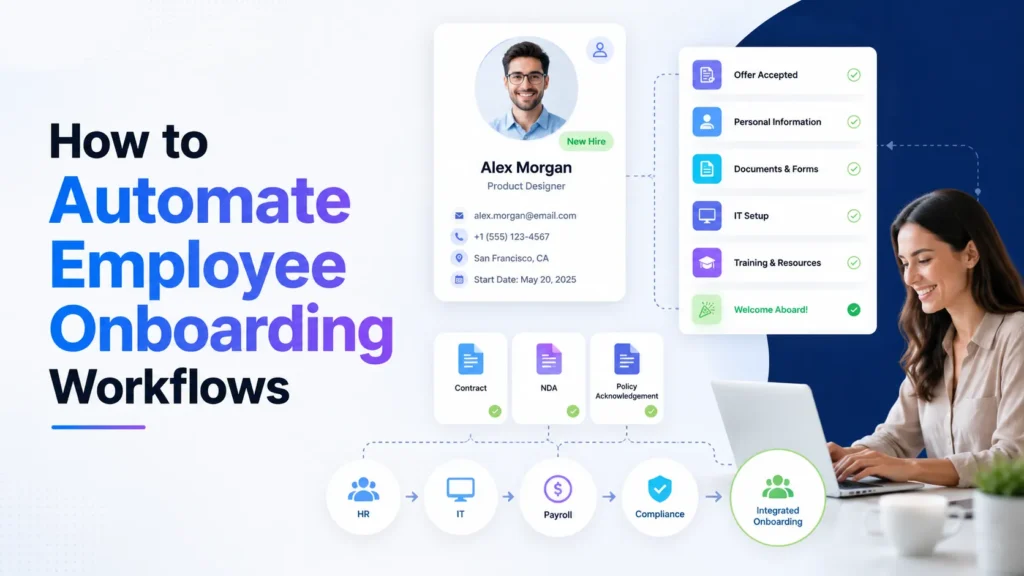
Automate employee onboarding by triggering only after a confirmed hire, validating the start date and role, and coordinating HR, IT, payroll and manager tasks from one controlled record. Use approvals for access decisions and track day-one readiness, overdue tasks and follow-ups during the first 30–90 days.
Employee onboarding spans teams and legal responsibilities. The goal is readiness and a humane welcome, not merely sending more scheduled emails.
Who this guide is for, and what it does not promise
HR operations teams, managers and IT administrators with repeated hiring processes and unclear handoffs. An onboarding checklist is a reference document. An onboarding automation creates assigned tasks, checks prerequisites and records completion. It should complement the HR system of record rather than duplicate sensitive employee data across random tools.
The practical outcome is a system that another person can inspect, operate and improve. Any timings, costs, or examples below are planning examples rather than measured private benchmarks. A result in your own business depends on data quality, integration limits, permissions, process design and the people responsible for exceptions.
Step-by-step implementation and buying framework
Step 1: Confirm the lifecycle boundary
Start only when a hire is approved, an offer is accepted where required and the start date is confirmed.
Practical example: An offer draft must not create a payroll account or trigger equipment orders.
Safeguard: Allow HR to cancel or revise tasks when a start date changes.
Write the output of this step as a clear field or decision that the next owner can understand. The objective is a repeatable operational decision, not a one-off demonstration that works only with perfect sample data.
Step 2: Map owners and prerequisites
Record HR, IT, facilities, payroll and manager handoffs along with what each team requires before work starts.
Practical example: A laptop shipment may depend on address consent while privileged access needs explicit approval.
Safeguard: No team should receive the full employee file by default.
Before wiring apps together, check a representative record with both complete and missing information. The objective is a repeatable operational decision, not a one-off demonstration that works only with perfect sample data.
Step 3: Choose the authoritative employee record
Keep an approved HRIS or people database as the source of truth for identity, department, location and manager.
Practical example: Downstream project tasks carry reference IDs rather than copies of passport or compensation fields.
Safeguard: Use minimum necessary personal data and retention periods.
Avoid adding an AI model merely because it is available; a deterministic check is often easier to audit. The objective is a repeatable operational decision, not a one-off demonstration that works only with perfect sample data.
Step 4: Create role-based task bundles
Choose templates by department, work arrangement, location and access requirements.
Practical example: A remote engineer needs VPN and code repository access; an in-office retail employee needs different systems.
Safeguard: Tasks should be idempotent when the trigger fires twice.
Record where the input came from and what an authorized team member may change. The objective is a repeatable operational decision, not a one-off demonstration that works only with perfect sample data.
Step 5: Automate reminders and handoffs
Send tasks to accountable owners with due dates and escalation when deadlines are missed.
Practical example: IT gets a device ticket; the manager gets a 30-day plan reminder.
Safeguard: Avoid auto-notifying the employee about incomplete confidential checks.
Decide what should happen when the source is late, blank or inconsistent with another system. The objective is a repeatable operational decision, not a one-off demonstration that works only with perfect sample data.
Step 6: Provision access safely
Send access requests through identity management and approvals rather than granting rights from an AI guess.
Practical example: A system owner approves a restricted finance workspace before IT creates the entitlement.
Safeguard: Use least privilege, review groups and log changes.
Keep the workflow observable: a user should be able to locate the run and inspect what failed. The objective is a repeatable operational decision, not a one-off demonstration that works only with perfect sample data.
Step 7: Plan day-one and week-one checks
Confirm equipment, welcome agenda, key contacts, policy acknowledgments and first-week learning goals.
Practical example: An automated checklist reminds a manager to introduce the new hire to peers, but a person conducts the meeting.
Safeguard: Offer alternative accessible channels and timezone-aware schedules.
Test normal, duplicate and deliberately incorrect inputs before increasing volume. The objective is a repeatable operational decision, not a one-off demonstration that works only with perfect sample data.
Step 8: Measure the first 90 days
Review readiness, overdue tasks, provisioning incidents and completion of check-ins.
Practical example: A weekly dashboard highlights missing devices before employees report them on day one.
Safeguard: Measure onboarding quality and employee feedback, not only task counts.
Compare the value of this step with its ongoing subscription and maintenance burden. The objective is a repeatable operational decision, not a one-off demonstration that works only with perfect sample data.
A realistic end-to-end example
A distributed 40-person company hires one remote customer-support specialist. On HR confirmation, the system creates a job-specific task set, sends equipment and access requests to separate owners, and schedules manager meetings. A missing shipping address pauses the device task without blocking permitted training. On the start date, the manager confirms that work tools actually function. If the employee postpones, the workflow changes due dates and revokes prematurely granted access through approved IT procedures.
A useful pilot starts with a small, permissioned sample set and explicit success criteria. Observe one standard case, a missing-data case, a duplicated event and an upstream service failure. Make sure the expected human is notified when manual action is needed. Once the normal path is trustworthy, increase volume gradually and check that costs remain in the intended range.
Inputs, outputs and exception ownership
| Element | What to define | Why it matters |
|---|---|---|
| Trigger | One unambiguous event or approved status | Prevents premature or duplicate activity |
| Required input | Typed fields, approved content and source identifiers | Stops a plausible AI answer being treated as verified data |
| Expected output | The record, draft, action or decision created | Makes success objectively testable |
| Owner | A human who can review and repair the result | Prevents silent failure |
| Audit record | Source ID, timestamp, outcome and relevant change history | Supports troubleshooting and safer corrections |
A process becomes expensive when it cannot answer a basic question: which source event created this action, what rule was applied and who can reverse it? Keeping these definitions next to the workflow also helps new team members maintain it.
How to compare effort, cost and reliability
Use the same test scenario across candidate platforms. Record setup effort, number of billable actions or credits, user and channel limits, exception visibility, integration permissions, and the time required to make a small change. These are decision inputs, not universal rankings. A cheaper entry plan may become a costly production option when support, usage and retried events are added.
For a simple break-even calculation, start with the actual monthly minutes spent on the process, multiply by the number of occurrences and compare with the software, review and maintenance effort after automation. Include rework and incident response rather than counting only the happy path. Financial estimates are illustrative until you measure your own baseline.
Common mistakes and how to avoid them
Starting from the wrong recruitment stage
Offer-sent is not necessarily a confirmed hire; early triggers create avoidable provisioning. Define a clear owner, validation rule and recovery path; if the workflow cannot explain what happens when this problem occurs, it is not ready to handle business-critical records unattended.
Copying personal data everywhere
Store only IDs and minimum task context outside protected HR systems. Define a clear owner, validation rule and recovery path; if the workflow cannot explain what happens when this problem occurs, it is not ready to handle business-critical records unattended.
Treating access approval as a language-model decision
Identity rights need deterministic authorization and owner approval. Define a clear owner, validation rule and recovery path; if the workflow cannot explain what happens when this problem occurs, it is not ready to handle business-critical records unattended.
Ending on day one
Training, feedback and manager check-ins should continue into the agreed onboarding period. Define a clear owner, validation rule and recovery path; if the workflow cannot explain what happens when this problem occurs, it is not ready to handle business-critical records unattended.
Monitoring, safety and iteration
Monitor three outcomes separately: whether the trigger occurred, whether the downstream action succeeded and whether the final business outcome was correct. A green API response does not prove a customer saw the correct message or a team member received a usable record. Review exceptions on a schedule suited to business risk and keep a clearly labeled manual override.
Protect data by limiting credentials to required scopes, preferring service-owned connections, rotating secrets and removing personal details from prompts that do not need them. Make sure customer-facing automation observes applicable privacy and communication requirements. When AI is involved, test malicious and irrelevant input, require grounded responses and route uncertain decisions to a person.
Related guides on AI Automation Hacks
Explore process mapping before automation for an adjacent implementation or buying decision.
Explore business workflow automation playbook for an adjacent implementation or buying decision.
Explore AI automation agency guide for an adjacent implementation or buying decision.
Explore AI data entry automation for an adjacent implementation or buying decision.
Explore Make vs Zapier comparison for an adjacent implementation or buying decision.
Frequently asked questions
What is the best onboarding trigger?
Use confirmed hire status and verified start date from the approved HR system.
Can IT provisioning be automated?
Yes, through supported identity and service-management integrations while keeping access approval controlled.
How do I handle employee onboarding in the UK?
Map UK-specific right-to-work, privacy and employment obligations with qualified internal or external advisors; do not automate legal judgments from a generic article.
Should a new hire see every task?
No. Internal HR, payroll and IT security tasks are separate from the employee-facing checklist.
What metric matters most?
Day-one readiness is a useful leading metric; pair it with follow-up completion and employee feedback.
Official documentation and further reading
- Official product or documentation page
- Official product or documentation page
- Official product or documentation page
Final recommendation
Begin with the narrowest useful workflow or decision in this guide and measure its real outcomes before scaling. Keep the published explanation aligned with the functionality you can verify, the price units your team will actually pay and the exceptions you can handle. The best automation is the one that solves a defined task reliably, with understandable ownership and no unearned claims about results.