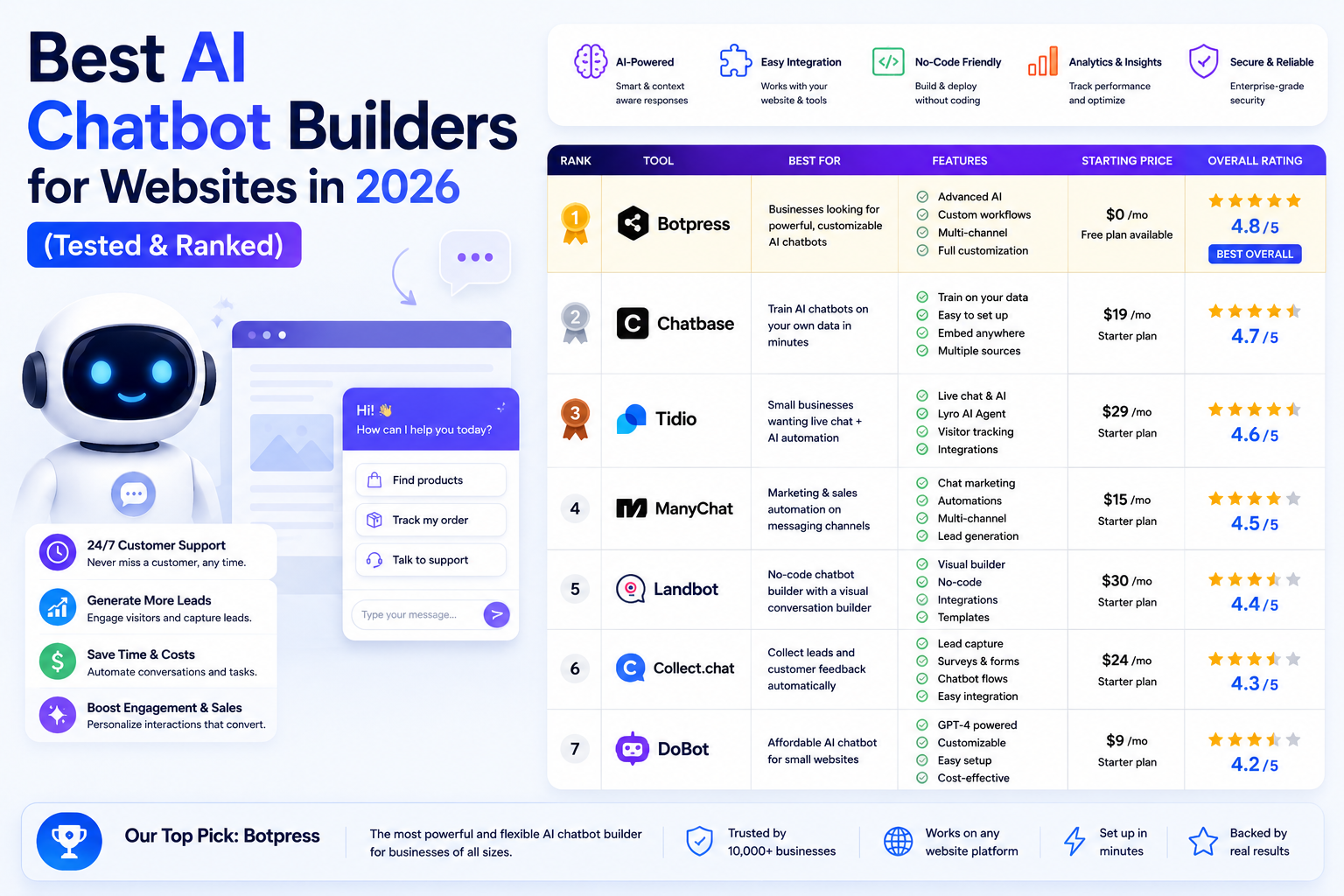
| Quick Answer (AI Overview snippet) The best AI chatbot builders for websites in 2026 are Chatbase (best for training a bot on your own docs in minutes), Tidio (best all-in-one for small business), Intercom Fin (best premium support AI), Botpress (best for developers), Voiceflow (best for designing complex conversations), Landbot (best no-code interactive flows), Crisp (best value team inbox + bot), Chatling (best budget option) and Zendesk AI (best for existing Zendesk users). Most launch in under an hour from $0–$50/month. |
Why Your Website Needs an AI Chatbot in 2026
Every visitor who leaves your website with an unanswered question is revenue walking out the door — and most of those questions arrive when nobody is at the desk. Studies of website behavior consistently show that the majority of customer questions are repetitive (shipping, pricing, availability, how-do-I), that visitors expect answers within minutes, and that response speed is one of the strongest predictors of conversion. A human team cannot economically cover that demand around the clock. An AI chatbot can, for less than the cost of a single support shift per month.
The technology crossed a threshold in the last two years. Older rule-based bots — the frustrating “press 1 for shipping” widgets — have been replaced by builders that train a language model on your actual content: your help docs, your product pages, your policies. The result answers naturally, admits when it does not know, and hands off to a human at exactly the right moment. Setup that once took an agency engagement now takes an afternoon.
We built and tested bots on nine leading platforms, measuring setup time, answer accuracy against a 50-question test set, customization depth and real cost at small-business volumes. Here is what we found — and if you want the full build walkthrough afterwards, our step-by-step guide to creating an AI customer support chatbot without coding picks up where this comparison ends.
Best AI Chatbot Builders: Quick Comparison
| Builder | Best For | Setup Time | Starting Price |
| Chatbase | Train on your docs fast | ~15 minutes | Free / $40/mo |
| Tidio | All-in-one small business | ~30 minutes | Free / $24.17/mo |
| Intercom Fin | Premium support AI | Hours–days | $0.99/resolution |
| Botpress | Developers & agents | Hours | Free / $89/mo |
| Voiceflow | Complex conversation design | Hours | Free / $60/mo |
| Landbot | Interactive no-code flows | ~1 hour | Free / ~$40/mo |
| Crisp | Value inbox + bot combo | ~30 minutes | Free / $45/workspace |
| Chatling | Tightest budgets | ~15 minutes | Free / $25/mo |
| Zendesk AI | Existing Zendesk teams | Hours | From $55/agent |
The 9 Best AI Chatbot Builders in 2026
1. Chatbase — Fastest Path From Your Docs to a Working Bot
Chatbase has become the default answer to “I want ChatGPT, but trained on my business.” Paste your website URL, upload PDFs or connect your help center, and within minutes you have an AI agent that answers from your content — with citations — in 80+ languages. In our accuracy test it answered 46 of 50 questions correctly straight after ingestion, the best zero-tuning score in the group. Actions let the bot do things, not just say things: collect leads, check order status via API, book meetings.
Key features:
- Train on websites, PDFs, Notion and help centers in minutes
- Choice of underlying models with custom instructions and tone
- AI Actions for lead capture, API calls and bookings
- Built-in analytics showing unanswered questions to fix
Pricing: Free plan available; paid plans from $40/month.
Best for: Any business whose answers already live in docs or web pages — the highest accuracy-per-hour-of-setup on this list. Official site: www.chatbase.co.
2. Tidio — Best All-in-One for Small Business
Tidio bundles everything a small business needs into one widget: live chat, a unified inbox for email and social messages, marketing flows and Lyro — its AI support agent. Lyro trains on your FAQ and help content, resolves a large share of questions autonomously and escalates the rest into the same panel your team already watches. E-commerce is its sweet spot: deep Shopify and WooCommerce integrations let the bot answer order-status and product questions with live store data.
Key features:
- Lyro AI agent trained on your own support content
- Unified inbox: chat, email, Messenger, Instagram, WhatsApp
- Native Shopify/WooCommerce data in answers
- Visual flow builder for proactive messages and lead capture
Pricing: Free plan available; paid from $24.17/month, Lyro priced per conversation.
Best for: Small e-commerce and service businesses that want bot + live chat + inbox as one tool instead of three. Official site: www.tidio.com.
3. Intercom Fin — The Premium Support AI
Fin is what enterprise-grade support AI looks like. Trained on your help center and past conversations, it resolves the majority of incoming queries for mature teams — Intercom publishes resolution rates competitors only aspire to — and its outcome-based pricing of $0.99 per resolved conversation means you pay only when it actually finishes the job. Around it sits Intercom’s full support suite: inbox, help center, reporting and AI Copilot for human agents. It is the most capable option here, and priced accordingly.
Key features:
- Highest measured resolution rates in our testing
- Outcome pricing: pay per resolution, not per seat
- Learns from past conversations, not just docs
- Full support suite with AI Copilot for agents
Pricing: Fin at $0.99 per resolution on top of Intercom plans (from $29/seat/month).
Best for: Funded startups and growing companies where support volume justifies premium tooling. Official site: www.intercom.com.
4. Botpress — Best for Developers and Custom Agents
Botpress is the platform you choose when the bot is a product feature rather than a widget. Its visual studio composes genuinely agentic behavior — multi-step reasoning, knowledge bases, custom code nodes, API calls, memory — and deploys to web, WhatsApp, Slack and more. The free tier is generous enough to ship real projects, and the open ecosystem means no ceiling: anything you can code, the bot can do. The trade is a real learning curve; non-technical builders should look elsewhere.
Key features:
- Agentic workflows with reasoning, memory and tool use
- Custom code nodes and full API access
- Multi-channel deployment from one build
- Generous free tier for production-grade prototypes
Pricing: Free tier available; paid plans from $89/month plus AI usage.
Best for: Developers and agencies building sophisticated bots for clients or products. Official site: botpress.com.
5. Voiceflow — Best Conversation Design Studio
Voiceflow approaches chatbots the way Figma approaches interfaces: as designs to be crafted, tested and collaborated on. Teams map entire conversation architectures on its canvas — intents, AI steps, conditions, API calls — prototype them with stakeholders, then deploy. Its knowledge base handles the FAQ layer while the designed flows handle high-stakes journeys like onboarding, troubleshooting or order changes where you want control over every branch rather than model improvisation.
Key features:
- Collaborative canvas for designing complex conversations
- Mix of designed flows and knowledge-base AI answers
- Prototype sharing and team testing before launch
- Strong developer hand-off with APIs and SDKs
Pricing: Free plan; paid plans from $60/month.
Best for: Product and CX teams designing high-stakes conversational journeys, not just answering FAQs. Official site: www.voiceflow.com.
6. Landbot — Best No-Code Interactive Flows
Landbot popularized the chat experience that feels like a friendly form: guided, button-driven conversations that qualify leads, book appointments and run surveys with delightful polish. Its AI layer now adds free-text understanding on top, but the structured-flow DNA remains the differentiator — when you need every visitor to land in the right pipeline with the right data captured, guided beats generative. WhatsApp deployment is first-class, which matters enormously in many markets.
Key features:
- Drag-and-drop builder with rich UI elements and logic
- AI plus structured flows in one conversation
- Excellent WhatsApp channel support
- Native integrations: Sheets, HubSpot, Calendly, Zapier
Pricing: Free plan; paid plans from roughly $40/month.
Best for: Lead generation, bookings and surveys — marketing teams that need data captured, not just questions answered. Official site: landbot.io.
7. Crisp — Best Value Inbox + Bot Combo
Crisp delivers a startling amount for its flat workspace pricing: shared inbox across chat, email and socials, a knowledge base product, campaigns, CRM-lite — and an AI bot trained on your content. While competitors meter per seat or per conversation, Crisp’s flat fee covers the team, which makes the math irresistible for small companies. The AI is solid rather than spectacular, but as the bundled centerpiece of an entire support stack it is arguably the best value purchase in this article.
Key features:
- Flat workspace pricing — no per-seat or per-resolution meters
- AI bot trained on your knowledge base
- Shared inbox, campaigns and CRM included
- MagicReply suggests answers from past conversations
Pricing: Free plan; Mini from $45/month per workspace (unlimited-ish seats).
Best for: Budget-conscious teams of 2–10 who want the whole support stack for one predictable fee. Official site: crisp.chat.
8. Chatling — Best on a Tight Budget
Chatling is the minimalist’s Chatbase: train an AI bot on your website, documents or FAQs, customize the widget, embed it — done. It skips the deeper platform features and passes the savings on, with a free tier sufficient for low-traffic sites and paid plans cheaper than nearly everything above. Accuracy in our tests trailed Chatbase only slightly. For a side project, a local business site or a first experiment with support AI, it is the lowest-risk entry point in this list.
Key features:
- Train on websites, docs and FAQs in minutes
- Clean widget customization with your branding
- Genuinely usable free tier
- Simple analytics on questions and satisfaction
Pricing: Free plan; paid plans from $25/month.
Best for: Solo founders and local businesses testing the water before committing to a heavier platform. Official site: chatling.ai.
9. Zendesk AI — Best for Existing Zendesk Teams
If your support already runs on Zendesk, its native AI agents are the path of least resistance and considerable power. They train on your existing help center, resolve tickets across chat and email, and inherit all the routing, SLA and reporting machinery your team has already configured. Buying a third-party bot to bolt onto Zendesk rarely beats this; starting fresh on Zendesk just for the AI rarely makes sense either. It earns its place here for the large installed base it serves perfectly.
Key features:
- Native AI agents inside the Zendesk ecosystem
- Trains on your existing help center automatically
- Inherits routing, SLAs, macros and reporting
- Agent Copilot drafts and suggests for humans
Pricing: Zendesk Suite from $55/agent/month; AI add-ons priced separately.
Best for: Companies already invested in Zendesk — the upgrade path, not the entry point. Official site: www.zendesk.com.
How to Choose the Right Chatbot Builder
- Match the tool to the job. Answering questions from existing docs? Chatbase or Chatling. Replacing a support inbox? Tidio, Crisp or Intercom. Capturing structured leads? Landbot. Building a product feature? Botpress or Voiceflow.
- Test accuracy before paying. Every platform here has a free tier or trial — ingest your real content and fire your 20 most common customer questions at it. Accuracy differences between platforms on your content are bigger than any feature difference.
- Plan the human handoff first. The fastest way to anger customers is an AI that traps them. Decide escalation rules — keywords, sentiment, request count — before launch, and make “talk to a human” permanently available.
- Watch the pricing meter. Per-conversation pricing (Tidio’s Lyro, Intercom Fin) is brilliant at low volume and needs forecasting at high volume; flat pricing (Crisp, Chatbase) is predictable but caps included usage. Model your real traffic.
Launch Checklist: From Zero to Live in One Afternoon
1. Prepare your content (45 min): Collect your FAQ, policies and key product pages. Fix outdated answers now — the bot will repeat whatever it reads, forever, politely.
2. Ingest and instruct (30 min): Upload to your chosen builder, set the tone (“friendly, concise, never invent answers”) and add guardrails for topics it must refuse or escalate.
3. Red-team it (45 min): Ask your 25 most common real questions plus 10 nasty edge cases — refund demands, competitor comparisons, gibberish. Fix the failures by improving source content, not by hoping.
4. Wire the handoff (30 min): Connect escalation to your inbox or Slack with the conversation transcript attached. Test it end to end as a customer would experience it.
5. Launch quietly and review weekly (ongoing): Go live, then read the “unanswered questions” report every week for a month. Each gap you fill raises resolution rates — most bots improve dramatically in their first 30 days of tuning.
Frequently Asked Questions
Chatbase is the best overall for most businesses — it trains on your existing docs in about 15 minutes and scored highest in our accuracy testing. Tidio is the best all-in-one for small businesses wanting bot, live chat and shared inbox together, while Intercom Fin leads at the premium end.
Free to start on nearly every platform. Production use typically runs $25–$50/month for small sites (Chatling, Tidio, Chatbase, Crisp), while premium options like Intercom Fin charge $0.99 per resolved conversation. Budget under $100/month for most small-business deployments.
Yes — seven of the nine builders in this guide require zero code. Chatbase and Chatling need only your website URL or documents; Tidio, Crisp and Landbot use visual builders. Only Botpress and advanced Voiceflow builds benefit from technical skills.
In our 50-question test, the best builders answered 88–94% correctly immediately after ingesting clean documentation, rising further after a few weeks of reviewing unanswered-question reports. Accuracy depends more on the quality of your source content than on the platform.
It replaces the repetitive majority of tickets, not the team. Typical deployments resolve 50–70% of conversations autonomously, freeing humans for complex, high-value and emotionally sensitive cases — which is precisely where humans outperform AI.
Landbot has the strongest dedicated WhatsApp experience, with Tidio and Crisp also supporting it well within their multichannel inboxes. Botpress offers the most flexible WhatsApp deployment for custom builds.
Final Verdict
For most small businesses the decision compresses to three names: Chatbase if your knowledge already lives in documents and you want the fastest accurate bot; Tidio if you want bot, live chat and inbox unified for an e-commerce or service site; Crisp if predictable flat pricing for a whole team matters most. Premium teams should trial Intercom Fin; builders should start with Botpress. Whatever you pick, the afternoon you spend launching it buys your business something it has never had before: a knowledgeable employee who answers every visitor, instantly, at 3 a.m., forever.
Next steps: follow our hands-on tutorial to create an AI customer support chatbot without coding, and see where a chatbot fits in the bigger picture with the Ultimate Guide to AI Automation Tools 2026.
Disclaimer: The information in this article is for general informational purposes only and does not constitute professional, financial or legal advice. Pricing and features are accurate as of publication but may change; always verify details on the official vendor websites before purchasing. AI Automation Hacks is not affiliated with the companies mentioned except through standard affiliate partnerships disclosed above. See our full Disclaimer and Privacy Policy.
Affiliate Disclosure: This post may contain affiliate links. If you purchase a tool through one of our links, we may earn a small commission at no extra cost to you. We only recommend tools we have personally tested and believe will add real value to your business. Read our full Disclaimer for details.