Affiliate Disclosure: This post may contain affiliate links. If you purchase a tool through one of our links, we may earn a small commission at no extra cost to you. We only recommend tools we have personally tested and believe will add real value to your business. Read our full Disclaimer for details.
| Quick Answer (AI Overview snippet) The best AI video generators in 2026 are Synthesia (best AI avatar videos for business and training), HeyGen (best avatar realism and translation), Runway (best creative text-to-video), Pictory (best blog-to-video conversion), InVideo AI (best prompt-to-complete-video), Descript (best edit-by-text workflow), OpusClip (best long-video-to-shorts repurposing) and VEED (best browser-based all-rounder). Prices run from free tiers to about $30–$90/month. |
Video Without the Video Shoot
Video dominates every platform’s algorithm and every audience’s attention — and it has always been the most expensive content to produce. A single polished explainer used to mean scripting, filming, presenting on camera, editing, captioning and exporting: days of work or thousands in agency fees. That equation is what AI video generators broke. In 2026, the working reality is that a small business can turn a script into a presenter-led video in ten minutes, convert a blog post into a narrated explainer in five, and slice one webinar into twenty captioned social clips automatically.
The category has matured into distinct species, and choosing well means knowing which species you need. Avatar generators put a photorealistic AI presenter on screen reading your script. Creative text-to-video models generate cinematic footage from prompts. Repurposing engines transform content you already have — blogs, podcasts, webinars — into new video formats. And AI-assisted editors collapse the post-production grind into text edits.
We tested the leaders in each species against real small-business jobs: a product explainer, a training module, a blog conversion and a social clip batch. Here are the eight that earned their place, with honest pricing and the use case each one wins. For the visuals that accompany your videos — thumbnails especially — our Best AI Image Generators comparison is the companion guide.
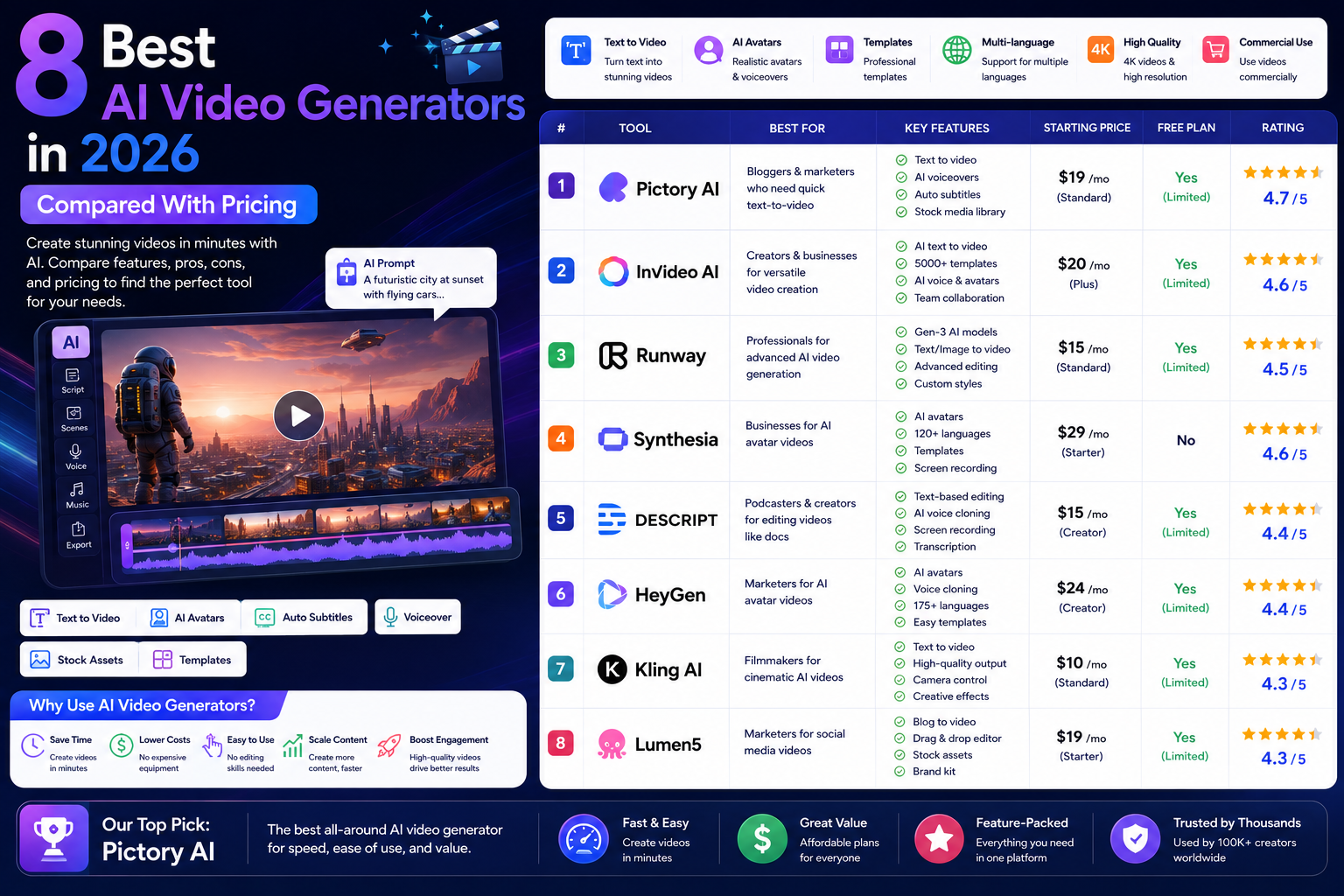
Best AI Video Generators: Quick Comparison
| Tool | Species | Best For | Starting Price |
| Synthesia | Avatar | Training & corporate video | $18/month |
| HeyGen | Avatar | Realism & translation | Free / $24/month |
| Runway | Creative gen | Cinematic text-to-video | Free / $12/month |
| Pictory | Repurposing | Blog-to-video | $19/month |
| InVideo AI | Prompt-to-video | Complete videos from prompts | Free / $28/month |
| Descript | AI editor | Edit video like a doc | Free / $12/month |
| OpusClip | Repurposing | Long video to shorts | Free / $15/month |
| VEED | All-round editor | Browser-based everything | Free / $12/month |
The 8 Best AI Video Generators in 2026
1. Synthesia — Best for Business, Training and Scale
Synthesia is the enterprise standard for avatar video, used by a striking share of the Fortune 100 for one reason: it turns documents into presenter-led video at industrial scale. Choose from 230+ stock avatars or create a custom avatar of yourself, paste a script in any of 140+ languages, and a studio-quality talking video renders in minutes. Updating a video means editing text and re-rendering — which is why training teams love it: when the policy changes, the video changes in five minutes, not five days of reshoots.
Key features:
- 230+ avatars plus custom personal avatars
- 140+ languages with natural AI voices
- One-click updates: edit script, re-render video
- Templates, screen recording and SCORM export for training
Pricing: From $18/month (Starter); team and enterprise tiers above.
Best for: Companies producing training, onboarding and how-to content repeatedly — the productivity gain compounds with every update. Official site: www.synthesia.io.
2. HeyGen — Best Avatar Realism and Translation
HeyGen pushes avatar quality furthest: its latest avatars gesture, intonate and emote convincingly enough that viewers regularly fail to clock them as AI. Its photo-to-avatar and instant custom avatar features lower the barrier — a webcam session yields a digital you — and its killer app is video translation: feed an existing video and HeyGen redubs it into dozens of languages with cloned voice and adjusted lip-sync. For founder-led marketing in multiple markets, that single feature replaces entire localization budgets.
Key features:
- The most lifelike avatars in our testing
- Instant custom avatars from a short webcam recording
- Video translation with voice cloning and lip-sync
- Interactive avatar agents for websites
Pricing: Free plan available; paid from $24/month.
Best for: Creators and founders who want a digital presenter that genuinely passes — and anyone selling across languages. Official site: www.heygen.com.
3. Runway — Best Creative Text-to-Video
Runway is the artist of the list. Its Gen-series models generate original cinematic footage from text or image prompts — camera moves, lighting, style — making shots exist that you could never film. Professional productions already use it for b-roll, concept work and effects; small businesses use it for scroll-stopping product shots and ad creative that looks like a production budget. It demands more craft than the one-click tools: prompting video well is a skill, and clips need assembling into finished pieces elsewhere.
Key features:
- State-of-the-art text- and image-to-video generation
- Director-style controls over camera and motion
- AI editing suite: inpainting, green screen, style transfer
- Industry adoption from indie creators to film studios
Pricing: Free credits to start; paid plans from $12/month.
Best for: Marketers and creators who need original footage and visual wow — the ceiling here is the highest in the category. Official site: runwayml.com.
4. Pictory — Best Blog-to-Video Conversion
Pictory does one job with ruthless efficiency: it turns text you already have into watchable video. Paste a blog URL and it extracts the key points, matches each to stock footage, adds captions and AI voiceover, and outputs a branded summary video ready for YouTube or social — typically in under ten minutes of human involvement. For content-rich businesses sitting on years of articles, Pictory is a content multiplier: every post becomes a video, every video becomes reach on platforms the blog never touched.
Key features:
- Blog URL or script to finished video automatically
- Auto-matched stock footage with scene-level editing
- AI voiceovers and automatic captions
- Brand templates for consistent output at volume
Pricing: From $19/month after trial.
Best for: Bloggers and content teams who want their written library working on video platforms with minimal effort. Official site: pictory.ai.
5. InVideo AI — Best Complete Videos From a Prompt
InVideo AI is the closest thing to “type what you want, receive a finished video.” Describe the video — topic, audience, length, vibe — and it writes the script, assembles footage, adds voiceover, music and captions, and delivers a complete cut. Then comes its best trick: revise by command. “Make the intro punchier,” “change the voice to British female,” “replace the office shots” — and it re-edits accordingly. Output sits at solid-social-content level rather than cinematic, which is precisely what most businesses need daily.
Key features:
- Full videos — script, footage, voice, music — from one prompt
- Conversational editing by typed commands
- Huge stock library and template ecosystem
- YouTube and social formats handled natively
Pricing: Free plan with watermark; paid from $28/month.
Best for: Time-poor businesses that need a steady stream of decent videos with near-zero production skill. Official site: invideo.io.
6. Descript — Best Edit-by-Text Workflow
Descript rebuilt editing around a simple idea: edit the transcript, and the video follows. Delete a sentence from the text, that take disappears from the timeline. Its AI tools stack on top — studio sound cleanup, eye-contact correction, filler-word removal in one click, voice cloning for fixing flubbed lines without re-recording, and AI clip selection for social cuts. For podcasters, course creators and anyone who records talking content regularly, Descript turns the most hated stage of production into something close to word processing.
Key features:
- Edit video and audio by editing the transcript
- One-click filler-word and silence removal
- Overdub voice cloning to fix lines in post
- AI eye contact, green screen and studio sound
Pricing: Free plan; paid from $12/month.
Best for: Podcasters, course creators and talking-head channels — the biggest editing-time reduction on this list. Official site: www.descript.com.
7. OpusClip — Best Long-Video-to-Shorts Engine
OpusClip answers the most common video question of the short-form era: how do I feed the Reels/Shorts/TikTok machine without living in an editor? Drop in a long video — webinar, podcast, sermon, stream — and its AI finds the most engaging moments, reframes them vertically with the speaker tracked, adds animated captions and emojis, and scores each clip’s viral potential. One hour of source material routinely yields a month of daily short-form posts.
Key features:
- AI selects the most clip-worthy moments automatically
- Auto vertical reframing with active speaker tracking
- Animated captions, b-roll and brand templates
- Virality scoring and direct social scheduling
Pricing: Free plan available; paid from $15/month.
Best for: Anyone with long-form content and short-form ambitions — the best effort-to-output ratio in this article. Official site: www.opus.pro.
8. VEED — Best Browser-Based All-Rounder
VEED is the generalist: a full video editor in the browser with an unusually complete AI layer — text-to-video generation, avatars, AI voices and voice cloning, one-click background removal, eye contact correction, automatic subtitles in 100+ languages and silence removal. No single feature leads its category, but having all of them in one tab, with no install and a gentle learning curve, makes VEED the sensible default for teams that need to do a bit of everything without buying four subscriptions.
Key features:
- Complete browser editor — nothing to install
- AI generation, avatars, voices and cleanup tools in one
- Auto subtitles in 100+ languages
- Collaborative review and brand kits for teams
Pricing: Free plan; paid from $12/month.
Best for: Small teams that want one affordable tool covering generation, editing and captioning adequately. Official site: www.veed.io.
How to Choose Your AI Video Tool
- Match species to job. Presenter-led training? Synthesia or HeyGen. Original footage and ads? Runway. Mining existing content? Pictory or OpusClip. You record yourself talking? Descript. A bit of everything? VEED or InVideo AI.
- Watch the export meters. Most plans cap minutes generated or exported per month — the real constraint at volume. Price your actual monthly output before choosing a tier.
- Test with your worst-case content. Free tiers exist on six of these eight. Run your jargon-heavy script or echo-y webinar through them — tools diverge far more on hard inputs than on demo material.
- Mind the disclosure line. Avatar and voice-clone video of real people requires consent everywhere and disclosure in a growing list of jurisdictions and platforms. Label AI presenters — audiences punish discovered deception far harder than disclosed automation.
A Practical Starter Workflow for a Small Business
Step 1: Pick your one highest-leverage format — for most businesses, that is short social clips or a recurring explainer series, not a cinematic brand film.
Step 2: Build the pipeline around existing assets: blog posts feed Pictory, recorded calls and webinars feed OpusClip, written FAQs feed a Synthesia avatar series. Creating from what exists beats creating from scratch ten times over.
Step 3: Template everything — intro, captions style, outro CTA — so every video ships on-brand without decisions.
Step 4: Batch monthly: one afternoon generating, one hour reviewing and scheduling through your social tools — see our AI social media automation guide for that half of the pipeline.
Frequently Asked Questions
Synthesia is the best for business and training videos with AI presenters; Runway is the best for generating original cinematic footage; OpusClip is the best for turning long videos into social shorts; and InVideo AI is the best for complete videos from a single prompt. The right tool depends on which video job you are hiring it for.
For talking-head content, training, explainers and social clips — largely yes, at a fraction of the cost. For brand films, events and anything requiring real footage of your actual business, videographers remain irreplaceable. Most companies now split the work accordingly.
Free tiers exist at HeyGen, Runway, InVideo, Descript, OpusClip and VEED, usually with watermarks or minute caps. Serious use runs $12–$30/month per tool, with Synthesia’s business tiers and Runway’s heavy-generation plans reaching $60–$90+. A complete small-business pipeline typically totals $30–$60/month.
Yes, when using a platform’s licensed stock avatars or a custom avatar made with the subject’s consent. Cloning a real person’s likeness or voice without permission is illegal in a growing number of jurisdictions. Several regions and platforms also require labeling synthetic media — disclose AI presenters as standard practice.
OpusClip if you have long-form source material to mine; InVideo AI or VEED if you are creating shorts from scratch. All three handle vertical formats, auto-captions and direct scheduling.
Yes — HeyGen, Runway, InVideo, Descript, OpusClip and VEED all offer free plans sufficient for testing and light publishing, typically with watermarks or monthly minute limits. Expect to pay once video becomes a weekly part of your marketing.
Final Verdict
AI hasn’t just made video cheaper — it has changed what kind of asset video is. When a training video updates like a document, when a blog archive doubles as a YouTube channel, when one webinar fuels a month of shorts, video stops being a production event and becomes a byproduct of work you were already doing. Start with the tool that mines your existing content — Pictory or OpusClip for most businesses — add an avatar platform when you need a consistent presenter, and reach for Runway when a campaign deserves footage nobody could film. The production barrier is gone; what you do with that is the strategy.
Round out your stack with our guides to the Best AI Image Generators and the Ultimate Guide to AI Automation Tools 2026.
Disclaimer: The information in this article is for general informational purposes only and does not constitute professional, financial or legal advice. Pricing and features are accurate as of publication but may change; always verify details on the official vendor websites before purchasing. AI Automation Hacks is not affiliated with the companies mentioned except through standard affiliate partnerships disclosed above. See our full Disclaimer and Privacy Policy.